This operation adds a Report page to any CrudController, allowing admins to see metrics (stats, charts) about the entity's data. Each metric fetches its data independently via AJAX, so the page loads fast and metrics render as they become available.
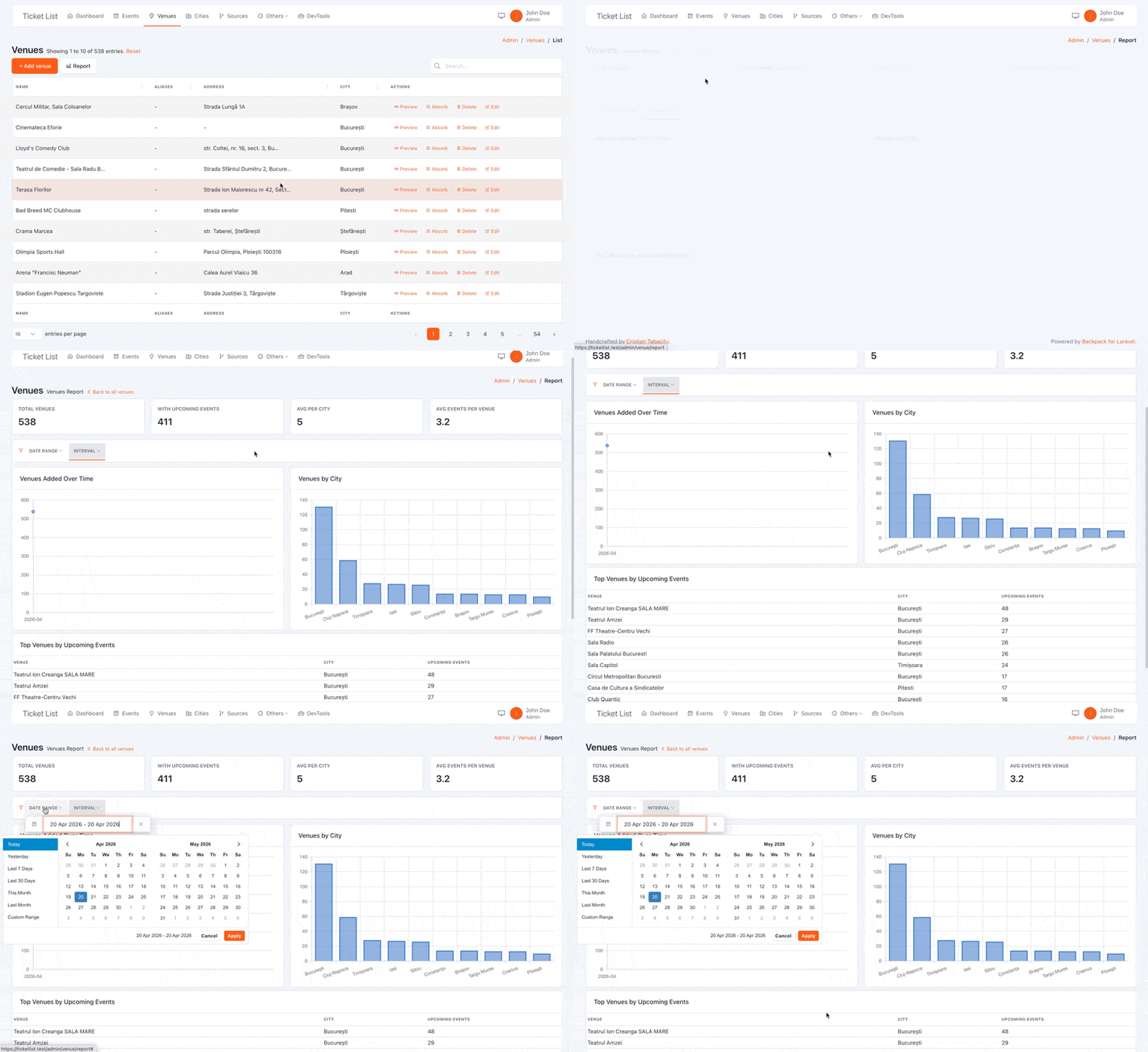
Key features:
- Auto-injected filters — date range and interval filters are added automatically;
- Out-of-the-box support for common metric types - the top 6 metric types are already covered;
- Easily create new metrics - clear docs for creating custom components in the report;
Metrics:
- Stat metrics — single-value cards (count, sum, avg, min, max) with optional comparison (previous period, or custom);
- Line & bar chart metrics — time-series data grouped by day/week/month/year;
- Stacked bar & stacked line metrics — time-series data broken down by a category column (e.g. orders over time, stacked by status);
- Pie chart metrics — categorical breakdowns rendered as pie charts;
- Table metrics — grouped data displayed as a simple, sortable table with per-column aggregates;
- View metrics — render any custom Blade view as a metric (tables, progress bars, custom layouts, etc.);
Other features:
- Per-metric AJAX — each metric (or group of metrics) makes its own request;
- Grouped metrics — metrics that share a query can be batched into a single AJAX request;
- Custom resolve — full control over the data returned by any metric;
- Custom metric types — register your own metric types (PHP resolver + JS handler) without modifying core files;
- Config file — cross-controller defaults for wrappers, interval, period column, etc.;
- JavaScript events — listen to
backpack:metric:updatedandbackpack:metric:errorDOM events for any metric; - Static metrics — metrics placed above the filters, never reloaded when filters change (e.g. all-time totals).
Requirements
- Backpack\CRUD ^7.0
- Backpack\PRO — required for the
date_rangefilter type used by the auto-injected date range filter
The operation uses Chart.js for charts, loaded automatically via @basset.
Installation
Once published on repo.backpackforlaravel.com:
composer require backpack/report-operation
Until then, install directly from GitHub:
composer config repositories.report-operation vcs https://github.com/Laravel-Backpack/report-operation
composer require backpack/report-operation:dev-main
No further setup is needed. The service provider is auto-discovered.
To publish the config file (optional):
php artisan vendor:publish --tag=backpack-report-config
How to Use
Step 1. Use the operation trait on your CrudController:
use \Backpack\ReportOperation\Http\Controllers\Operations\ReportOperation;
Step 2. Define your metrics in setupReportOperation():
protected function setupReportOperation()
{
    $this->addMetric('total_orders', [
        'type'      => 'stat',
        'label'     => 'Total Orders',
        'aggregate' => 'count',
        'period'    => 'created_at',
        'compare'   => true,
    ]);

    $this->addMetric('orders_over_time', [
        'type'      => 'line',
        'label'     => 'Orders Over Time',
        'aggregate' => 'count',
        'period'    => 'created_at',
    ]);
}
That's it. A Report button will appear in the List operation top bar, linking to the report page.
How It Works
The ReportOperation uses two routes:
GET /{segment}/report— renders the report page with metric placeholders (spinners);POST /{segment}/report/metric-data— AJAX endpoint that resolves one or more metrics and returns JSON;
On page load, the JavaScript reads the metric widgets from the DOM and builds a load plan: ungrouped metrics fire individual requests, grouped metrics share a single request. When data comes back, stat cards are updated with their values and chart canvases are rendered via Chart.js.
Two CRUD filters are auto-injected:
- Date Range (
date_rangetype) — sets the time window for all metrics; - Interval (
dropdowntype) — controls chart grouping (Daily / Weekly / Monthly / Yearly);
The report page has two sections:
- Static metrics — rendered above the filters navbar. These are loaded once on page load, never reloaded when filters change, and always reflect the full, unfiltered dataset. Set
'section' => 'static'to place a metric here. - Dynamic metrics — rendered below the filters navbar (the default). These re-fetch whenever the user changes a filter (date range, interval).
When filters change, only dynamic metrics re-fetch.
Metric Types
Stat
A single-value card showing an aggregate number.
$this->addMetric('total_products', [
    'type'        => 'stat',          // required
    'label'       => 'Total Products',
    'description' => 'All products currently in the catalogue.',
    'aggregate'   => 'count',         // count | sum | avg | min | max
    'column'      => 'price',         // required for sum, avg, min, max
    'period'      => 'created_at',    // date column for filtering & comparison
    'compare'     => true,            // show % change vs previous period
    'format'      => '$:value',       // format the displayed value
]);
Line
A time-series line chart.
$this->addMetric('revenue_over_time', [
    'type'        => 'line',       // required
    'label'       => 'Revenue Over Time',
    'description' => 'Daily revenue based on completed orders.',
    'column'      => 'amount',
    'aggregate'   => 'sum',        // count | sum | avg | min | max
    'period'      => 'created_at', // date column used for grouping & filtering
]);
Bar
Same as line but renders as a bar chart. Use 'type' => 'bar'.
Stacked Bar
A stacked bar chart that breaks down a time-series by a category column. Each unique value in the stack_by column becomes a separate dataset stacked on the same bars.
$this->addMetric('orders_by_status', [
    'type'      => 'stacked-bar',
    'label'     => 'Orders by Status',
    'aggregate' => 'count',
    'period'    => 'created_at',
    'stack_by'  => 'status',
    'colors'    => [                   // optional: label => color
        'pending'   => 'rgba(255, 206, 86, 0.8)',
        'completed' => 'rgba(0, 200, 83, 0.8)',
        'cancelled' => 'rgba(255, 99, 132, 0.8)',
    ],
]);
When colors is provided as an associative array, its key order determines the series order in the chart. Series values not listed in colors are appended with colors from a default palette.
Stacked Line
Same as stacked-bar but renders as a stacked area chart. Use 'type' => 'stacked-line'.
$this->addMetric('revenue_by_category', [
    'type'      => 'stacked-line',
    'label'     => 'Revenue by Category',
    'column'    => 'amount',
    'aggregate' => 'sum',
    'period'    => 'created_at',
    'stack_by'  => 'category',
]);
Pie
A pie chart showing a categorical breakdown. Groups rows by a column and counts (or aggregates) each group.
// Count products by status
$this->addMetric('products_by_status', [
    'type'   => 'pie',
    'label'  => 'Products by Status',
    'column' => 'status',
]);

// Sum revenue grouped by a different column
$this->addMetric('revenue_by_category', [
    'type'      => 'pie',
    'label'     => 'Revenue by Category',
    'column'    => 'price',
    'aggregate' => 'sum',
    'group_by'  => 'category_id',  // group by a different column than the value column
]);
When aggregate is count (default), column is the grouping column. When using sum/avg/min/max, set group_by to specify the grouping column and column for the value column.
Table
A simple data table that groups rows by a column and displays per-column aggregates. Great for "top N" lists, breakdowns by category, or any tabular summary.
// Top 5 categories by total revenue and order count
$this->addMetric('top_categories', [
    'type'     => 'table',
    'label'    => 'Top Categories',
    'group_by' => 'category_name',
    'columns'  => [
        'category_name' => 'Category',                                              // display column (from group_by)
        'total_orders'  => ['label' => 'Orders',  'aggregate' => 'count'],
        'revenue'       => ['label' => 'Revenue', 'aggregate' => 'sum', 'column' => 'price', 'format' => '$:value'],
    ],
    'order_by' => ['revenue', 'desc'],  // optional, defaults to first aggregate desc
    'limit'    => 5,                    // optional, defaults to 5
]);
Each entry in columns can be:
- A string — a display-only column whose value comes from the
group_bycolumn (e.g.'category_name' => 'Category'); - An array — an aggregate column with
label,aggregate(count/sum/avg/min/max), optionalcolumn(DB column for the aggregate), and optionalformat(:valueplaceholder is replaced with the actual value).
The group_by option is required for auto-resolved tables (just like pie). If you need full control, use a resolve closure instead — the table will skip auto-resolution and render whatever rows you return:
// Custom resolve — no group_by needed
$this->addMetric('recent_orders', [
    'type'    => 'table',
    'label'   => 'Recent Orders',
    'columns' => [
        'id'       => '#',
        'customer' => 'Customer',
        'total'    => ['label' => 'Total', 'format' => '$:value'],
        'status'   => 'Status',
    ],
    'resolve' => function ($query, $filters) {
        $rows = $query->latest()->limit(5)->get(['id', 'customer', 'total', 'status']);

        return [
            'columns' => [
                ['key' => 'id', 'label' => '#'],
                ['key' => 'customer', 'label' => 'Customer'],
                ['key' => 'total', 'label' => 'Total'],
                ['key' => 'status', 'label' => 'Status'],
            ],
            'rows' => $rows->map(fn ($r) => [
                'id'       => $r->id,
                'customer' => $r->customer,
                'total'    => '$'.number_format($r->total, 2),
                'status'   => $r->status,
            ])->toArray(),
        ];
    },
]);
The table metric defaults to col-md-12 (full width). Override with the wrapper option if needed.
View
A fully custom Blade view rendered server-side and returned as HTML via AJAX. Use this when the built-in types don't fit — custom tables, ranked lists, progress trackers, multi-KPI layouts, or anything else.
$this->addMetric('top_products', [
    'type'    => 'view',
    'label'   => 'Top Products',
    'view'    => 'admin.metrics.top_products',
    'wrapper' => ['class' => 'col-md-12'],
]);
Your Blade view receives three variables:
| Variable | Type | Description |
|---|---|---|
$metric |
CrudMetric |
The metric instance (access $metric->label, $metric->extra, etc.) |
$query |
Builder |
The Eloquent query, already scoped by the metric's query closure and date-range filters |
$filters |
array |
Active filter values: date_from, date_to, interval |
Example view (resources/views/admin/metrics/top_products.blade.php):
@php
    $products = $query->clone()
        ->orderByDesc('price')
        ->limit(5)
        ->get(['name', 'price', 'status']);
@endphp

<table class="table table-sm table-striped mb-0">
    <thead>
        <tr>
            <th>Product</th>
            <th class="text-end">Price</th>
            <th>Status</th>
        </tr>
    </thead>
    <tbody>
        @forelse ($products as $product)
            <tr>
                <td>{{ $product->name }}</td>
                <td class="text-end">${{ number_format($product->price, 2) }}</td>
                <td>{{ $product->status }}</td>
            </tr>
        @empty
            <tr><td colspan="3" class="text-secondary text-center">No data</td></tr>
        @endforelse
    </tbody>
</table>
The view is re-rendered on every filter change (date range, interval), so it stays in sync with the other metrics.
Important: The rendered HTML is injected via
innerHTML, which means<script>tags will not be executed. For interactivity inside a view metric, use Alpine.js directives or inline event handlers. To run JavaScript when a view metric refreshes, use the JavaScript events system instead.
Examples
Most Eloquent models share three timestamp columns: created_at, updated_at, and deleted_at (when using SoftDeletes). Those three columns alone are enough to build a useful, informative dashboard for any entity — users, orders, products, you name it.
The block below is a complete setupReportOperation() you can drop into any CrudController. It'll work as-is if your model has those timestamps; remove the soft-delete metrics at the bottom if your model doesn't use SoftDeletes.
protected function setupReportOperation()
{
    // ---------------------------------------------------------------
    // STATIC SECTION — shown above the filters navbar, never affected by date range
    // ---------------------------------------------------------------

    // Active entries (not soft-deleted)
    $this->addMetric('active_entries', [
        'type'    => 'stat',
        'label'   => 'Active Entries',
        'section' => 'static',
        'wrapper' => ['class' => 'col-md-3'],
    ]);

    // Total ever created (including soft-deleted)
    $this->addMetric('all_time_created', [
        'type'    => 'stat',
        'label'   => 'All Time Created',
        'section' => 'static',
        'query'   => fn ($q) => $q->withTrashed(),
        'wrapper' => ['class' => 'col-md-3'],
    ]);

    // Total ever modified (updated_at differs from created_at)
    $this->addMetric('all_time_updated', [
        'type'    => 'stat',
        'label'   => 'All Time Updated',
        'section' => 'static',
        'query'   => fn ($q) => $q->withTrashed()->whereColumn('updated_at', '!=', 'created_at'),
        'wrapper' => ['class' => 'col-md-3'],
    ]);

    // Total soft-deleted  —  remove if your model doesn't use SoftDeletes
    $this->addMetric('all_time_deleted', [
        'type'    => 'stat',
        'label'   => 'All Time Deleted',
        'section' => 'static',
        'query'   => fn ($q) => $q->onlyTrashed(),
        'wrapper' => ['class' => 'col-md-3'],
    ]);

    // ---------------------------------------------------------------
    // ROW 1 — Period stats (respond to the date range filter)
    // ---------------------------------------------------------------
    $this->addMetricGroup(['class' => 'row'], function () {

        // Created in the selected period
        $this->addMetric('created', [
            'type'    => 'stat',
            'label'   => 'Created',
            'period'  => 'created_at',
            'compare' => true,
            'wrapper' => ['class' => 'col-md-4'],
        ]);

        // Modified in the selected period (actually edited, not just created)
        $this->addMetric('modified', [
            'type'    => 'stat',
            'label'   => 'Modified',
            'period'  => 'updated_at',
            'compare' => true,
            'query'   => fn ($q) => $q->whereColumn('updated_at', '!=', 'created_at'),
            'wrapper' => ['class' => 'col-md-4'],
        ]);

        // Soft-deleted in the selected period  —  remove if your model doesn't use SoftDeletes
        $this->addMetric('deleted', [
            'type'    => 'stat',
            'label'   => 'Deleted',
            'period'  => 'deleted_at',
            'compare' => true,
            'query'   => fn ($q) => $q->onlyTrashed(),
            'wrapper' => ['class' => 'col-md-4'],
        ]);
    });

    // ---------------------------------------------------------------
    // ROW 2 — Trends over time
    // ---------------------------------------------------------------
    $this->addMetricGroup(['class' => 'row mt-2'], function () {

        // Creation trend
        $this->addMetric('creations_over_time', [
            'type'    => 'line',
            'label'   => 'New Records Over Time',
            'period'  => 'created_at',
            'wrapper' => ['class' => 'col-md-4'],
        ]);

        // Edit activity trend (excludes records that were never modified)
        $this->addMetric('updates_over_time', [
            'type'    => 'bar',
            'label'   => 'Edits Over Time',
            'period'  => 'updated_at',
            'query'   => fn ($q) => $q->whereColumn('updated_at', '!=', 'created_at'),
            'wrapper' => ['class' => 'col-md-4'],
        ]);

        // Deletion trend  —  remove if your model doesn't use SoftDeletes
        $this->addMetric('deletions_over_time', [
            'type'    => 'bar',
            'label'   => 'Deletions Over Time',
            'period'  => 'deleted_at',
            'query'   => fn ($q) => $q->onlyTrashed(),
            'wrapper' => ['class' => 'col-md-4'],
        ]);
    });
}
Metric Options Reference
| Option | Type | Default | Description |
|---|---|---|---|
type |
string |
'stat' |
Metric type: stat, line, bar, stacked-bar, stacked-line, pie, table, view (or any custom registered type). |
label |
string |
Auto from name | Display label on the card/chart. |
description |
string|null |
null |
Optional explanatory text shown below the value (stat) or below the chart title (line/bar/pie). |
column |
string|null |
null |
DB column for sum/avg/min/max aggregates. |
aggregate |
string |
'count' |
Aggregate function: count, sum, avg, min, max. |
period |
string|null |
Config default | Date column for time filtering and chart grouping. Falls back to defaultPeriodColumn in config. |
compare |
bool|MetricComparison|null |
null |
Set to true for previous-period comparison, or pass a MetricComparison instance for custom logic. |
format |
string|null |
null |
Format string for stat display. :value is replaced with the actual value. E.g. '$:value', ':value users'. |
wrapper |
array |
From config | HTML attributes for the wrapper <div>. Typically ['class' => 'col-md-4']. Defaults come from the defaultWrappers config. |
query |
Closure|null |
null |
Modify the base query before aggregation. Receives $query, should return $query. |
resolve |
Closure|null |
null |
Fully custom data resolution. Receives ($query, $filters), must return an array. |
group |
string|null |
null |
Group name. Metrics with the same group share a single AJAX request. |
group_by |
string|null |
null |
(Pie / Table) Column to group by. For pie: when using a value aggregate. For table: required for auto-resolved tables. |
stack_by |
string|null |
null |
(Stacked bar / Stacked line) Column whose values become separate stacked datasets (e.g. 'status'). |
colors |
array|null |
null |
(Pie / Stacked bar / Stacked line) Associative array mapping category labels to colors. For stacked charts, key order also determines series order. |
columns |
array|null |
null |
(Table only) Column definitions. Keys are column identifiers; values are a label string (display-only) or array with label, aggregate, column, format. |
order_by |
array|null |
First agg. desc | (Table only) Sort order: ['column_key', 'asc'|'desc']. Defaults to the first aggregate column descending. |
limit |
int |
5 |
(Table only) Maximum number of rows to display. |
view |
string|null |
null |
(View only) Blade view name to render (e.g. 'admin.metrics.top_products'). |
section |
string |
'dynamic' |
Which page section to place the metric in: 'static' (above filters, loaded once, never reloaded) or 'dynamic' (below filters, reloads on filter changes). |
refreshInterval |
int|false |
false |
Auto-refresh interval in seconds. Set to e.g. 60 to re-fetch every 60 seconds. See Auto-Refresh. |
Static Metrics
The report page has two sections:
| Section | Position | Behavior |
|---|---|---|
| Static | Above the filters navbar | Loaded once on page load. Never reloaded when filters change. Date-range constraints are not applied — data always reflects the full, unfiltered dataset. |
| Dynamic (default) | Below the filters navbar | Re-fetches whenever the user changes a filter (date range, interval). Date-range constraints are applied. |
Set 'section' => 'static' to place a metric in the static section:
protected function setupReportOperation()
{
    // Static section — always shows the all-time total, regardless of date filter.
    $this->addMetric('total_customers_ever', [
        'type'    => 'stat',
        'label'   => 'Total Customers (All Time)',
        'section' => 'static',
    ]);

    // Dynamic section (default) — reloads whenever the date range changes.
    $this->addMetric('new_customers', [
        'type'    => 'stat',
        'label'   => 'New Customers',
        'compare' => true,
    ]);
}
Tip: Static metrics are a good fit for KPIs that give context but should never change as the user explores a time window — e.g. total users ever, all-time revenue, number of active subscriptions.
Note: When using
addMetricGroup(), if some metrics in the group are static and others are dynamic, they will be split into their respective sections automatically. The static ones render above the filters, the dynamic ones below.
Auto-Refresh (Polling)
Metrics can automatically re-fetch their data at a fixed interval using the refreshInterval option. This is useful for dashboards that stay open and need to reflect near-real-time data.
$this->addMetric('active_users', [
    'type'            => 'stat',
    'label'           => 'Active Users',
    'aggregate'       => 'count',
    'query'           => fn ($q) => $q->where('last_seen_at', '>=', now()->subMinutes(5)),
    'refreshInterval' => 30, // re-fetch every 30 seconds
]);
Behavior details:
- Value in seconds —
'refreshInterval' => 60means one request every 60 seconds. - Disabled by default — metrics without
refreshInterval(or withfalse) are fetched once on page load and on filter changes only. - Grouped metrics use the lowest interval — if two metrics share a group (via
groupMetrics()oraddMetricGroup()) and one hasrefreshInterval => 30while the other hasrefreshInterval => 60, the group refreshes every 30 seconds in a single request. - Request deduplication — if a polling tick fires while a previous request for the same metrics is still in-flight, the new request is skipped. This prevents request pile-up on slow connections or fast intervals.
- Tab visibility — polling pauses automatically when the browser tab is hidden and resumes when the user returns.
- Filter changes restart the timer — when a filter changes, metrics re-fetch immediately and the polling interval resets from that point.
Static metrics ('section' => 'static') can also use refreshInterval — they will poll without sending filter parameters:
$this->addMetric('server_uptime', [
    'type'            => 'stat',
    'label'           => 'Server Uptime',
    'section'         => 'static',
    'refreshInterval' => 10,
    'resolve'         => function ($query, $filters) {
        return ['value' => getServerUptime(), 'formatted' => ':value%'];
    },
]);
Customizing Queries
Scoping with query
Use the query option to add conditions to the base query before the aggregate runs:
$this->addMetric('active_users', [
    'type'      => 'stat',
    'label'     => 'Active Users',
    'aggregate' => 'count',
    'query'     => fn ($query) => $query->where('status', 'active'),
]);
This works for both stat and chart metrics.
Full Control with resolve
When you need complete control over what a metric returns, use resolve. The closure receives the query (already scoped by date range if a period is set) and the filters array:
$this->addMetric('unique_categories', [
    'type'    => 'stat',
    'label'   => 'Unique Categories',
    'resolve' => function ($query, $filters) {
        return [
            'value' => $query->distinct('category_id')->count('category_id'),
        ];
    },
]);
For chart metrics, your resolve must return ['labels' => [...], 'data' => [...]] (or ['labels' => [...], 'datasets' => [...]] for stacked charts):
$this->addMetric('custom_chart', [
    'type'    => 'line',
    'label'   => 'Custom Chart',
    'resolve' => function ($query, $filters) {
        $rows = $query->selectRaw('MONTH(created_at) as m, COUNT(*) as c')
                      ->groupBy('m')->orderBy('m')->get();
        return [
            'labels' => $rows->pluck('m')->toArray(),
            'data'   => $rows->pluck('c')->toArray(),
        ];
    },
]);
Custom Comparisons
The compare option accepts true (shorthand for previous-period comparison) or any class implementing MetricComparison. This lets you create your own comparison strategies without modifying the core package.
The MetricComparison Interface
use Backpack\ReportOperation\CrudMetric;
use Illuminate\Database\Eloquent\Builder;

interface MetricComparison
{
    public function resolve(CrudMetric $metric, Builder $query, array $filters, float $currentValue): array;
}
Your resolve method receives:
$metric— theCrudMetricinstance (access$metric->query,$metric->getPeriodColumn(),$metric->runAggregate(), etc.);$query— the base query, already scoped by date range;$filters— the current filter values (date_from,date_to,interval);$currentValue— the aggregate value for the current period;
It must return an array with previous and change keys:
return [
    'previous' => 42.0,   // the comparison value
    'change'   => 15.3,   // percentage change (positive = up arrow, negative = down arrow)
];
Built-in: PreviousPeriod
The built-in PreviousPeriod comparison computes the same aggregate for a period of equal duration immediately before the selected date range. Using 'compare' => true is equivalent to:
use Backpack\ReportOperation\PreviousPeriod;

$this->addMetric('total_orders', [
    'type'    => 'stat',
    'compare' => new PreviousPeriod(),
]);
Creating a Custom Comparison
For example, to compare against the same date range in the previous year:
namespace App\Metrics;

use Backpack\ReportOperation\CrudMetric;
use Backpack\ReportOperation\MetricComparison;
use Closure;
use Illuminate\Database\Eloquent\Builder;

class PreviousYear implements MetricComparison
{
    public function resolve(CrudMetric $metric, Builder $query, array $filters, float $currentValue): array
    {
        $from = $filters['date_from'] ?? null;
        $to = $filters['date_to'] ?? null;
        $periodColumn = $metric->getPeriodColumn($query);

        if (! $from || ! $to || ! $periodColumn) {
            return ['previous' => null, 'change' => null];
        }

        // Shift the date range back by one year.
        $previousFrom = date('Y-m-d', strtotime($from . ' -1 year'));
        $previousTo = date('Y-m-d', strtotime($to . ' -1 year'));

        $previousQuery = $query->getModel()->newQuery();
        if ($metric->query instanceof Closure) {
            $previousQuery = ($metric->query)($previousQuery) ?? $previousQuery;
        }

        $previousQuery->where($periodColumn, '>=', $previousFrom)
                       ->where($periodColumn, '<=', $previousTo);

        $previous = $metric->runAggregate($previousQuery);

        $change = $previous != 0
            ? round((($currentValue - $previous) / abs($previous)) * 100, 1)
            : ($currentValue != 0 ? 100.0 : 0.0);

        return [
            'previous' => $previous,
            'change'   => $change,
        ];
    }
}
Then use it:
use App\Metrics\PreviousYear;

$this->addMetric('total_orders', [
    'type'    => 'stat',
    'label'   => 'Total Orders',
    'compare' => new PreviousYear(),
]);
Custom Metric Types
The package is designed to be extended. Both the PHP backend and JS frontend use a registry pattern — you can add new metric types without modifying any core files.
Creating a Custom Type
1. PHP resolver — implement MetricType:
namespace App\Metrics;

use Backpack\ReportOperation\CrudMetric;
use Backpack\ReportOperation\MetricType;
use Illuminate\Database\Eloquent\Builder;

class FunnelType implements MetricType
{
    public function resolve(CrudMetric $metric, Builder $query, array $filters): mixed
    {
        // Your data logic — return whatever structure your JS handler expects.
        return [
            'stages' => ['Visited', 'Signed Up', 'Purchased'],
            'values' => [1000, 350, 80],
        ];
    }
}
2. Register the PHP type (e.g. in a service provider or setupReportOperation()):
use Backpack\ReportOperation\CrudMetric;
use App\Metrics\FunnelType;

CrudMetric::registerType('funnel', FunnelType::class);
3. Blade view — create resources/views/vendor/backpack-report/metrics/funnel.blade.php:
<div class="card" data-metric="{{ $metric->name }}" data-metric-type="{{ $metric->type }}">
    <div class="card-body">
        <div data-metric-placeholder>Loading...</div>
        <div data-metric-content style="display:none;"></div>
    </div>
</div>

@pushOnce('after_scripts')
<script>
BackpackReportMetrics.register('funnel', function(widget, data) {
    var placeholder = widget.querySelector('[data-metric-placeholder]');
    var content = widget.querySelector('[data-metric-content]');
    if (placeholder) placeholder.style.display = 'none';
    content.style.display = '';
    // Render your custom visualization with `data`
});
</script>
@endPushOnce
4. Use it:
$this->addMetric('purchase_funnel', [
    'type'  => 'funnel',
    'label' => 'Purchase Funnel',
]);
The built-in types (stat, line, bar, pie) are all registered this way in the service provider. You can even override them with CrudMetric::registerType('stat', YourCustomStatType::class).
Grouping Metrics
By default, each metric fires its own AJAX request. If several metrics query the same table and you want to reduce requests, group them:
$this->addMetric('total_orders', [
    'type' => 'stat',
    'aggregate' => 'count',
]);

$this->addMetric('avg_order_value', [
    'type' => 'stat',
    'column' => 'total',
    'aggregate' => 'avg',
    'format' => '$:value',
]);

$this->groupMetrics('order_stats', ['total_orders', 'avg_order_value']);
Grouped metrics are resolved in a single POST request. Each metric still runs its own query and aggregate, but the overhead of multiple HTTP roundtrips is avoided.
Note: Grouping only affects the AJAX transport. Each metric still gets its own independent query — they don't share a database query.
Metric Groups (Visual Layout)
By default all metrics are rendered inside a single <div class="row">. Use addMetricGroup() to organize metrics into separate visual containers on the same report page:
protected function setupReportOperation()
{
    // First group — stat cards in a row
    $this->addMetricGroup([
        'class' => 'row',
    ], function () {
        $this->addMetric('total_orders', [
            'type'      => 'stat',
            'label'     => 'Total Orders',
            'aggregate' => 'count',
            'compare'   => true,
            'wrapper'   => ['class' => 'col-md-3'],
        ]);

        $this->addMetric('total_revenue', [
            'type'      => 'stat',
            'label'     => 'Total Revenue',
            'column'    => 'total',
            'aggregate' => 'sum',
            'format'    => '$:value',
            'compare'   => true,
            'wrapper'   => ['class' => 'col-md-3'],
        ]);
    });

    // Second group — charts in a wider row
    $this->addMetricGroup([
        'class' => 'row mt-4',
    ], function () {
        $this->addMetric('orders_over_time', [
            'type'      => 'line',
            'label'     => 'Orders Over Time',
            'aggregate' => 'count',
            'period'    => 'created_at',
        ]);

        $this->addMetric('orders_by_status', [
            'type'   => 'pie',
            'label'  => 'Orders by Status',
            'column' => 'status',
        ]);
    });
}
Group Attributes
The first argument to addMetricGroup() accepts any HTML attributes for the container element:
| Key | Type | Default | Description |
|---|---|---|---|
element |
string |
'div' |
The HTML tag for the container. |
class |
string |
— | CSS classes (e.g. 'row', 'row mt-4 border-bottom'). |
id |
string |
— | An HTML id attribute. |
| any | string |
— | Any other valid HTML attribute (e.g. 'style', 'data-*'). |
Standalone Metrics
Metrics added outside of any addMetricGroup() call are automatically wrapped in a default <div class="row">. You can mix standalone metrics and groups:
// These two end up in an implicit <div class="row">
$this->addMetric('standalone_a', ['type' => 'stat', ...]);
$this->addMetric('standalone_b', ['type' => 'stat', ...]);

// This has its own container
$this->addMetricGroup(['class' => 'row mt-4'], function () {
    $this->addMetric('grouped_chart', ['type' => 'line', ...]);
});
Wrapper / Layout
Each metric is wrapped in a <div> whose HTML attributes you can control via the wrapper option, just like you would with CRUD fields:
$this->addMetric('big_chart', [
    'type'    => 'line',
    'label'   => 'Revenue',
    'wrapper' => ['class' => 'col-md-12'],  // full width
]);

$this->addMetric('small_stat', [
    'type'    => 'stat',
    'label'   => 'Users',
    'wrapper' => ['class' => 'col-md-3', 'style' => 'min-height: 120px;'],
]);
Default wrappers per metric type are defined in the config file.
Filters
The operation auto-injects two filters:
report_date_range— adate_rangefilter for selecting the time window;report_interval— adropdownfilter for chart grouping (Daily, Weekly, Monthly, Yearly);
These filters are added before setupReportOperation() runs, so you can remove or override them:
protected function setupReportOperation()
{
    // Remove the interval filter
    $this->crud->removeFilter('report_interval');

    // Replace the date range filter with a custom one
    $this->crud->removeFilter('report_date_range');
    $this->crud->addFilter([
        'name' => 'report_date_range',
        'type' => 'date_range',
        'label' => 'Period',
    ], false, function ($value) {
        // custom logic if needed
    });

    // ... add metrics
}
Metrics API
All methods are available on the controller via the ReportOperation trait:
| Method | Description |
|---|---|
$this->addMetric(string $name, array $config) |
Add a metric. |
$this->removeMetric(string $name) |
Remove a metric by name. |
$this->metric(string $name) |
Get a single CrudMetric instance. |
$this->metrics() |
Get all registered metrics as a flat associative array. |
$this->metricGroups() |
Get all metric groups for rendering (the single source of truth). |
$this->modifyMetric(string $name, array $config) |
Update properties of an existing metric. |
$this->addMetricGroup(array $attributes, Closure $callback) |
Add a visual metric group. Metrics added inside the callback belong to the group. |
$this->groupMetrics(string $groupName, array $metricNames) |
Batch metrics into a single AJAX request. |
// Modify an existing metric
$this->modifyMetric('total_orders', [
    'label' => 'All Orders',
    'wrapper' => ['class' => 'col-md-6'],
]);

// Remove a metric
$this->removeMetric('avg_order_value');
Configuration
Publish the config file:
php artisan vendor:publish --tag=backpack-report-config
This creates config/backpack/operations/report.php:
return [
    // CSS class for the report content container.
    'contentClass' => 'col-md-12',

    // Default date column when no 'period' is specified on a metric.
    'defaultPeriodColumn' => 'created_at',

    // Default chart interval: day | week | month | year
    'defaultInterval' => 'day',

    // Default wrapper classes per metric type.
    'defaultWrappers' => [
        'stat'         => ['class' => 'col-md-3'],
        'line'         => ['class' => 'col-md-6'],
        'bar'          => ['class' => 'col-md-6'],
        'stacked-bar'  => ['class' => 'col-md-6'],
        'stacked-line' => ['class' => 'col-md-6'],
        'pie'          => ['class' => 'col-md-6'],
        'view'         => ['class' => 'col-md-12'],
        'table'        => ['class' => 'col-md-12'],
    ],
];
You can also override config values per-controller:
protected function setupReportOperation()
{
    $this->crud->setOperationSetting('contentClass', 'col-md-10 mx-auto');

    // ... add metrics
}
Overriding Views
You can override any of the report views by creating them in your resources/views/vendor/backpack-report/ folder:
| View | Purpose |
|---|---|
report.blade.php |
Main report page layout |
metrics/stat.blade.php |
Stat card template |
metrics/line.blade.php |
Line chart template (delegates to chart.blade.php) |
metrics/bar.blade.php |
Bar chart template (delegates to chart.blade.php) |
metrics/pie.blade.php |
Pie chart template |
metrics/stacked-bar.blade.php |
Stacked bar chart template (delegates to stacked-chart.blade.php) |
metrics/stacked-line.blade.php |
Stacked line chart template (delegates to stacked-chart.blade.php) |
metrics/stacked-chart.blade.php |
Shared stacked chart container (canvas + Chart.js stacked logic) |
metrics/chart.blade.php |
Shared chart container (canvas + Chart.js logic) |
metrics/view.blade.php |
View metric card (custom Blade content) |
metrics/inc/report_scripts.blade.php |
JavaScript for AJAX fetching and metric dispatch |
buttons/report.blade.php |
Report button in the List operation |
Full Example
<?php

namespace App\Http\Controllers\Admin;

use Backpack\CRUD\app\Http\Controllers\CrudController;
use Backpack\CRUD\app\Http\Controllers\Operations\ListOperation;
use Backpack\ReportOperation\Http\Controllers\Operations\ReportOperation;

class OrderCrudController extends CrudController
{
    use ListOperation;
    use ReportOperation;

    protected function setupReportOperation()
    {
        // Stat cards
        $this->addMetricGroup([
            'class' => 'row',
        ], function () {
            $this->addMetric('total_orders', [
                'type'      => 'stat',
                'label'     => 'Total Orders',
                'aggregate' => 'count',
                'period'    => 'created_at',
                'compare'   => true,
                'wrapper'   => ['class' => 'col-md-4'],
            ]);

            $this->addMetric('total_revenue', [
                'type'      => 'stat',
                'label'     => 'Total Revenue',
                'column'    => 'total',
                'aggregate' => 'sum',
                'format'    => '$:value',
                'period'    => 'created_at',
                'compare'   => true,
                'wrapper'   => ['class' => 'col-md-4'],
            ]);

            $this->addMetric('avg_order', [
                'type'      => 'stat',
                'label'     => 'Avg Order Value',
                'column'    => 'total',
                'aggregate' => 'avg',
                'format'    => '$:value',
                'wrapper'   => ['class' => 'col-md-4'],
            ]);
        });

        // Charts
        $this->addMetricGroup([
            'class' => 'row mt-2',
        ], function () {
            $this->addMetric('orders_over_time', [
                'type'      => 'line',
                'label'     => 'Orders Over Time',
                'aggregate' => 'count',
                'period'    => 'created_at',
            ]);

            $this->addMetric('revenue_over_time', [
                'type'      => 'bar',
                'label'     => 'Revenue Over Time',
                'column'    => 'total',
                'aggregate' => 'sum',
                'period'    => 'created_at',
            ]);
        });

        // Pie chart
        $this->addMetricGroup([
            'class' => 'row mt-2',
        ], function () {
            $this->addMetric('orders_by_status', [
                'type'   => 'pie',
                'label'  => 'Orders by Status',
                'column' => 'status',
            ]);
        });

        // Stacked bar chart
        $this->addMetricGroup([
            'class' => 'row mt-2',
        ], function () {
            $this->addMetric('orders_stacked_by_status', [
                'type'      => 'stacked-bar',
                'label'     => 'Orders by Status Over Time',
                'aggregate' => 'count',
                'period'    => 'created_at',
                'stack_by'  => 'status',
                'colors'    => [
                    'pending'   => 'rgba(255, 206, 86, 0.8)',
                    'completed' => 'rgba(0, 200, 83, 0.8)',
                    'cancelled' => 'rgba(255, 99, 132, 0.8)',
                ],
            ]);
        });

        // Group stat cards into one AJAX request
        $this->groupMetrics('stats', ['total_orders', 'total_revenue', 'avg_order']);
    }
}
JavaScript Events
Every metric refresh dispatches DOM events that you can listen to from any script on the page. This is useful for cross-metric interactions, custom logging, or hooking into view metrics from outside.
Events
| Event | Dispatched on | Detail |
|---|---|---|
backpack:metric:updated |
The widget element (bubbles up to parent containers) | { name, type, data, widget } |
backpack:metric:updated:{name} |
document |
{ name, type, data, widget } |
backpack:metric:error |
The widget element (bubbles) | { name } |
backpack:metric:error:{name} |
document |
{ name } |
Listening to a Specific Metric
// React when the 'total_orders' stat finishes loading or refreshing
document.addEventListener('backpack:metric:updated:total_orders', function(e) {
    console.log('Total orders:', e.detail.data.value);
    // Update another part of the page, trigger an animation, etc.
});
Listening to All Metrics
The backpack:metric:updated event bubbles, so you can catch all updates from a parent container:
// Listen for ANY metric update inside the filterable section
document.getElementById('report-metrics').addEventListener('backpack:metric:updated', function(e) {
    console.log(e.detail.name, 'refreshed with', e.detail.data);
});
Error Handling
// React when a specific metric fails to load
document.addEventListener('backpack:metric:error:total_orders', function(e) {
    console.warn('Failed to load total_orders metric');
});
Tip: Events fire for all metric types (stat, line, bar, pie, view, and custom types). They are the recommended way to add JavaScript behavior to
viewmetrics, since<script>tags inside view metric HTML are not executed.
Troubleshooting
Chart spinner stays visible / chart doesn't render
- Clear the basset cache:
php artisan basset:clear, then hard-refresh the page. - Open the browser console and check for JavaScript errors. If
Chart is not defined, the Chart.js CDN failed to load — check your network or CSP settings.
Stat shows "—" (dash)
- The AJAX request failed. Open the browser console's Network tab to check for errors on the
metric-dataPOST request. Common causes: invalidcolumnname, missingperiodcolumn, or a query error.
Date range filter has no effect
- Make sure the
periodoption is set on your metric and points to a valid date/datetime column. Metrics without aperiodwon't be filtered by date range.
Previous period comparison shows 100% always
- Comparison requires both
periodandcompare => true(or aMetricComparisoninstance) on astatmetric. It also requires a date range to be selected — without a date range there's no "previous period" to compare against.
DATE_FORMAT errors on SQLite or PostgreSQL
- The default time-series resolution uses MySQL's
DATE_FORMAT(). For other databases, provide a customresolveclosure that uses the appropriate date functions.
Filters not showing up
- The report auto-injects filters during the
report:before_setuplifecycle hook. If you've overridden that hook or removed filters in yoursetupReportOperation(), they won't appear. Check that you haven't accidentally calledremoveAllFilters().
Package Access
You don't currently have access to this package. To gain access, go ahead and purchase it. You'll get:
Next 12 months
- download or install using Composer;
- all updates (major, minor and patch);
After 12 months
- can still access all versions and updates you paid;
- can still install using Composer;
- no new versions or updates;