Omni Search
A powerful global search bar, so your admins can look up within all entities in one place.
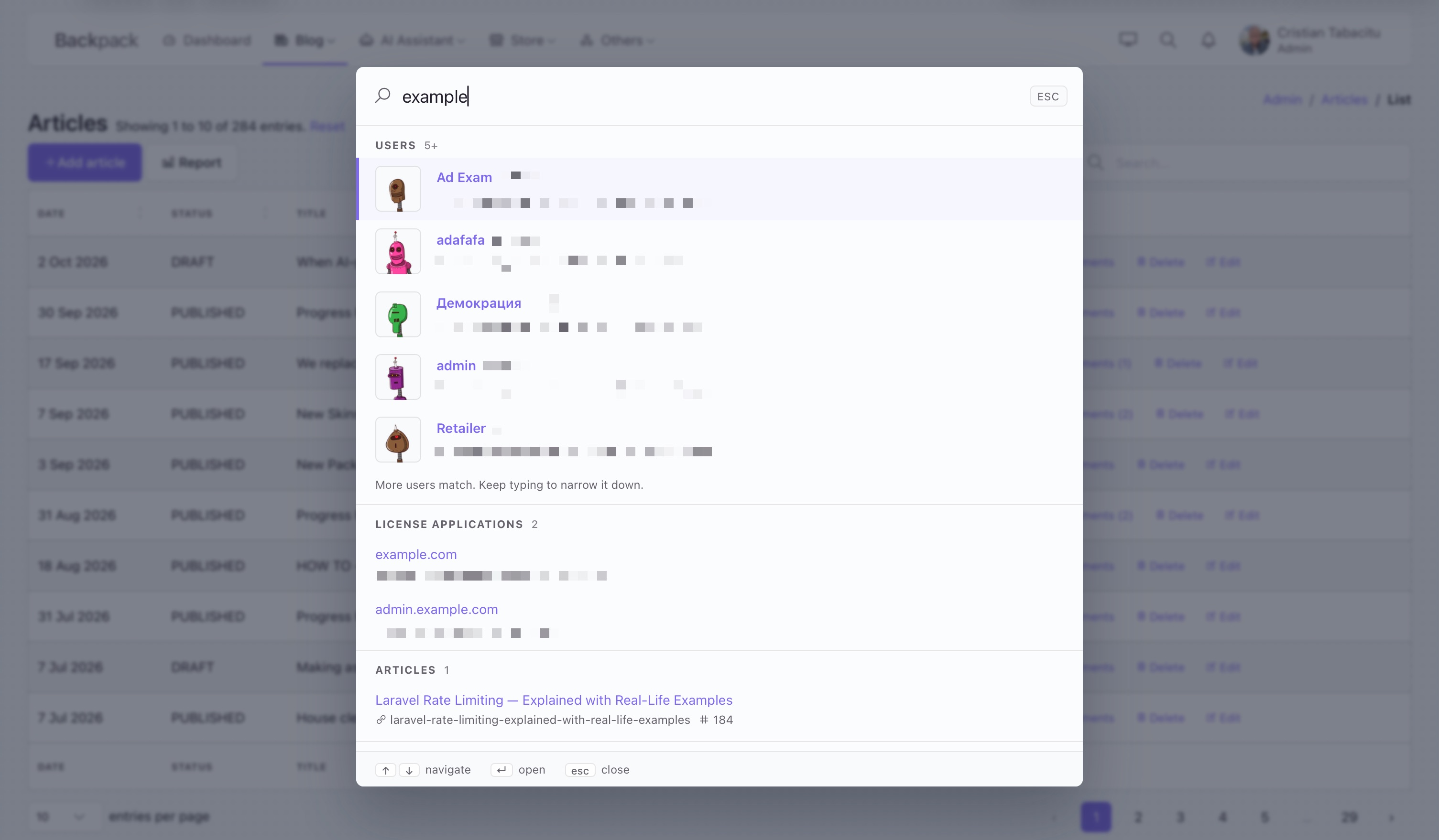
A global search (aka. command palette) for your Backpack admin panel. Your admins press one shortcut from any page and type a few letters to find a user, an invoice or an order, jump to any page in the sidebar, or run an action like "rebuild the cache", without touching the mouse. You tell it what to search in one config file; permissions, ranking and the UI are handled for you.
Buy it on backpackforlaravel.com/products/omnisearch.
Features
- Search any Eloquent model. List the model, the columns and the permission in
config/backpack/omnisearch.php. Multi-word terms must match every word, in any column. Exact matches on ids and numbers come first, then prefix matches, then the rest. - Jump to any page. Every link in your sidebar menu is a shortcut, with its own
@canchecks applied, so each admin only sees the pages they may open. Add shortcuts for pages the menu does not link to, including URLs built at search time. - Run actions. A shortcut can call a class of yours, built by the container: an invokable action, a method on a service, queue a job, clear a cache, send a report. The palette asks for confirmation when you want it to and shows the result as a toast.
- Permissions enforced twice. Each entity and shortcut takes a
canability. The palette hides what the admin may not use, and the JSON endpoints check again, so hiding is never the only protection. - Hits rendered as chips. Entities with a chip view (the ones Backpack ships, or your own) render it. The rest get a plain chip built from a title and detail patterns like
{name}and{author.name}. - Fast and light. Vanilla JavaScript, one CSS file, two JSON endpoints. No Livewire, no extra JavaScript framework, no search service to run. Results come a few per group, with a "Show more" row that loads the next page of that group in place.
- Follows your theme. Colors come from Tabler's CSS variables, so it switches with light and dark mode and with every Backpack skin.
- Speaks your admins' language. The palette ships in English, Romanian, Bulgarian, Portuguese, Spanish, French and German, and every label in the config can be a translation key.
Requirements
- Backpack for Laravel v7.1 or newer (so Laravel 12 or newer and PHP 8.2 or newer).
- The Tabler theme (
backpack/theme-tabler), which is Backpack's default.
Installation
Step 1. Buy access to this package and you get an access token. Then, like for every private Backpack add-on:
- add your token to your project's
auth.jsonby runningcomposer config http-basic.backpackforlaravel.com [your-token-username] [your-token-password]; - tell
composer.jsonto look for packages in our private repo too:
    "repositories": [
        {
            "type": "composer",
            "url": "https://repo.backpackforlaravel.com/"
        }
    ],
If you already have Backpack PRO or another private add-on installed, both are in place.
Step 2. Install the package and run its installer:
composer require backpack/omnisearch
php artisan omnisearch:install
The installer:
- publishes
config/backpack/omnisearch.php; - adds
@include('backpack.omnisearch::button')to your admin top bar, inresources/views/vendor/backpack/theme-tabler/inc/topbar_right_content.blade.php(it creates that override from the theme's default when you do not have one yet).
It prints what it did and leaves alone anything that is already there, so it is safe to run again.
Step 3. Open config/backpack/omnisearch.php and add your entities (see below). Then open the admin panel and press Cmd+K (or Ctrl+K).
The palette shows up for admins who may search at least one entity or use at least one shortcut. With menu_shortcuts on (the default), that is every admin, since they can all search their own sidebar.
Configuration
Everything lives in config/backpack/omnisearch.php. The file must stay cacheable (php artisan config:cache), so there are no closures in it: URLs and titles are patterns, and anything dynamic names a class and method of yours ([SomeClass::class, 'method'], 'SomeClass@method' or an invokable class), which the container builds and calls.
Entities
One entry per searchable model. Here is a complete one, with every option:
'entities' => [

    \App\Models\Invoice::class => [
        // Group heading in the palette, as a literal or a translation key (see
        // "Translating the palette"). Default: the model's plural name ("Invoices").
        'label' => 'Invoices',

        // Permission (Gate ability) needed to search this entity. Without it, every admin
        // may. The JSON endpoint applies the same check, so hiding is not cosmetic.
        'can' => 'manage invoices',

        // Columns matched with a case-insensitive "contains". Multi-word terms must
        // match every word, in any of these columns.
        'search' => ['customer_name', 'customer_email'],

        // Columns that must equal the whole term (ids, numbers). Exact matches rank
        // first, then prefix matches on the search columns, then the rest.
        'exact' => ['id', 'number'],

        // Where a hit links to, relative to the admin prefix. {attribute} placeholders are
        // filled from the entry. Default: "<kebab-case model>/{id}/show", so this line is
        // only needed when your CRUD route segment differs or you want the edit form.
        'url' => 'invoice/{id}/show',

        // A Blade view that renders the hit and receives $entry. Backpack's own chips
        // work here (crud::chips.user, crud::chips.general) and so does any view of yours.
        // Without it, the hit renders as a plain chip from the title and details below.
        'chip' => 'crud::chips.invoice',

        // Heading of the plain chip. Default: the first search column.
        'title' => '#{number} {customer_name}',

        // Detail lines of the plain chip, with an optional Line Awesome icon as the key.
        // Patterns can reach through relations. Default: the other search columns,
        // plus the entry's id. Set `details` and the id row goes away: list it
        // yourself ('la la-hashtag' => '{id}') if your admins know records by id.
        'details' => [
            'la la-envelope' => '{customer_email}',
            'la la-user' => '{user.name}',
        ],

        // Relations to eager-load before rendering, so five chips do not run five queries.
        'with' => ['items', 'user'],

        // Model scopes to apply to the search query.
        'scopes' => ['paid'],

        // A handler called with the query Builder, to narrow the search the way your
        // CRUD narrows its list (owner-only, tenant-only, whatever addClause() does).
        // The search runs on the model, not through the CrudController, so those rules
        // have to be said again here or in a scope; see "Permissions".
        'query' => [\App\Omnisearch\InvoiceSearch::class, 'narrow'],

        // Cap for this entity, overriding the global `limit`.
        'limit' => 3,
    ],

],
The two-line version works too:
\App\Models\Article::class => [
    'can' => 'manage articles',
    'search' => ['title', 'slug'],
],
That gives you an "Articles" group, hits that link to admin/article/{id}/show, a chip headed by the title with the slug and the id underneath.
Default URL. When you do not set url, the hit links to <kebab-case model name>/{id}/show: App\Models\BlogPost becomes blog-post/{id}/show. Backpack's own Route::crud('blog-post', ...) convention matches that, so most entities need no url at all. Set it when your route segment differs ('url' => 'posts/{id}/show'), when the Show operation is off ('url' => 'post/{id}/edit'), or when the key is not id ('url' => 'post/{slug}/show').
Shortcuts
Shortcuts are the first group in the palette: things the admin can do, rather than records. They come from two places.
The sidebar menu. With 'menu_shortcuts' => true (the default), every link in your sidebar menu becomes a "go to page" shortcut, labelled with its dropdown path ("Blog › Tags") and showing its icon. The menu is rendered for the current admin, so its own @can checks decide who sees what. Nothing to configure.
The shortcuts list. For pages the menu does not link to, and for actions:
'shortcuts' => [

    // Go to a page. `url` is an admin-relative path or an absolute URL.
    [
        'label' => 'Reorder categories',
        'url' => 'category/reorder',
        'description' => 'Drag blog categories into a new order',  // shown and searched
        'keywords' => 'sort',                                      // searched only
        'icon' => 'la la-sort',
        'can' => 'manage blog categories',
    ],

    // Go to a page whose URL has to be built at search time: a method of yours,
    // called through the container.
    [
        'label' => "Last month's invoices",
        'url' => [\App\Services\InvoiceReports::class, 'lastMonthUrl'],
        'description' => 'The invoice list filtered to the previous calendar month',
        'icon' => 'la la-calendar',
        'can' => 'manage invoices',
    ],

    // Run an action. `run` is called by the run endpoint, after the permission check.
    // Here an invokable class; [Class::class, 'method'] and 'Class@method' work too.
    [
        'label' => 'Rebuild the search index',
        'key' => 'rebuild-index',          // stable id for the run endpoint; defaults to a slug of the label
        'run' => \App\Actions\RebuildSearchIndex::class,
        'description' => 'Queue a full reindex, same as php artisan scout:import',
        'keywords' => 'scout meilisearch',
        'icon' => 'la la-sync',
        'confirm' => 'Rebuild the search index now? It takes a few minutes.',
        'can' => 'manage settings',
    ],

],
And the classes they point at: ordinary Laravel classes, anywhere in your app. The package resolves them through the container, so constructor injection works and a service you already have can serve as a handler as it is.
namespace App\Actions;

use Illuminate\Contracts\Bus\Dispatcher;

final class RebuildSearchIndex
{
    public function __construct(private Dispatcher $bus)
    {
    }

    public function __invoke(): array
    {
        $this->bus->dispatch(new \App\Jobs\ReindexEverything());

        return [
            'type' => 'success',                        // success, info, warning or error
            'message' => 'Reindexing. It takes a few minutes.',
            // 'redirect' => backpack_url('dashboard'),  // optional: where to send the admin afterwards
        ];
    }
}
namespace App\Services;

use App\Support\FiscalCalendar;

final class InvoiceReports
{
    public function __construct(private FiscalCalendar $calendar)
    {
    }

    public function lastMonthUrl(): string
    {
        [$from, $to] = $this->calendar->previousMonth();

        return backpack_url('invoice').'?'.http_build_query([
            'created_at' => json_encode(['from' => $from, 'to' => $to]),
        ]);
    }
}
A handler, for url and for run, is any of:
| Form | Example | Called as |
|---|---|---|
| A class and method | [\App\Services\InvoiceReports::class, 'lastMonthUrl'] |
app(InvoiceReports::class)->lastMonthUrl() |
A Class@method string |
'App\Services\InvoiceReports@lastMonthUrl' |
same |
A Class::method string |
'App\Services\InvoiceReports::lastMonthUrl' |
same |
| An invokable class | \App\Actions\RebuildSearchIndex::class |
app(RebuildSearchIndex::class)() |
A [Class, 'method'] pair whose method is static, as earlier versions required, still works: the class is built and the static method is called on the instance. Every form is strings, so the config stays cacheable; closures are not accepted.
For url, a string is a handler only when it names a class that exists (the part before @ or ::, or the whole string, is a class name the autoloader knows). Anything else is a path or an absolute URL, handled as before and never called, so 'https://user@host/path' and 'mailto:[email protected]' are safe.
A run handler returns a string (shown as an info toast) or an array with message, type and an optional redirect.
Shortcuts are matched in PHP, by word prefix on the label, the description and the keywords: "reord cat" finds "Reorder categories". Accents do not matter on either side, so "craciun" finds "Concert de Crăciun". Label matches rank before description-only matches.
Other options
| Key | Default | What it does |
|---|---|---|
limit |
5 |
Hits per group per page. While more remain, the group ends with a "Show more" row that loads the next page in place; each entity can override it with its own limit. |
min_length |
2 |
Terms shorter than this return nothing. |
max_length, max_words |
100, 8 |
Terms are cut to this many characters and words before they are matched. Every word adds one LIKE per search column to each query, so these keep a pasted paragraph from building a huge one. |
max_offset |
200 |
"Show more" stops once a group has shown this many hits; past that the admin should narrow the term. Deep pages are the expensive ones, since the database has to walk every row above them. |
debounce |
150 |
Milliseconds the admin has to pause typing before the palette asks the server. Raise it (300-400), together with min_length, on a large database: a request the palette abandons for the next keystroke still runs to completion on the server. |
route |
'omnisearch' |
Admin-relative path of the JSON endpoints: GET admin/omnisearch?q= (add &type=&offset= for one page of one group) and POST admin/omnisearch/run/{shortcut}. |
middleware |
['throttle:120,1'] |
Extra middleware for both endpoints, on top of Backpack's admin middleware. The default is a rate limit of 120 requests a minute per admin (per IP for guests), far above what typing produces. |
menu_shortcuts |
true |
Turn the sidebar menu into shortcuts. |
shortcuts_label |
null |
Heading of the shortcuts group, as a literal or a translation key. null uses the package's own, in the admin's locale. |
Permissions
Both entities and shortcuts take a can key: the name of a Gate ability, which with backpack/permissionmanager is simply a permission name like 'manage users'. It is enforced in two places:
- the palette only lists the groups the current admin may search, and only the shortcuts they may use;
- the search endpoint filters the same way, paging a group the admin may not search returns
403, and the run endpoint returns403for an action the admin may not run, before calling its handler.
Without a can, everyone who passes Backpack's admin middleware gets that entity or shortcut. Menu shortcuts need no can of their own: the menu's @can directives already decide.
Rows, not just entities. can decides whether an admin may search an entity at all; it says nothing about which rows. The search queries the model directly, so whatever your CrudController does in setup() to narrow its list (CRUD::addClause('where', 'status', 'published'), an owner-only or tenant-only filter) does not apply to the palette on its own: without more, an admin who may search invoices finds every invoice. Say those rules again, once, in one of two places:
// A scope on the model, when the rule belongs to the model anyway...
'scopes' => ['published'],

// ...or a handler of yours, called with the query Builder, for rules that need
// the current admin or do not belong on the model. Same forms as every other
// handler: [Class::class, 'method'], 'Class@method' or an invokable class.
'query' => [\App\Omnisearch\InvoiceSearch::class, 'narrow'],
namespace App\Omnisearch;

use Illuminate\Database\Eloquent\Builder;

class InvoiceSearch
{
    public function narrow(Builder $query): void
    {
        $query->where('team_id', backpack_user()->team_id);
    }
}
Both run before any matching, in every tier and on every page, so a row the handler excludes never appears, in the results or in "Show more". If the same rule lives in the CrudController, move it to the model (a scope, or a global scope if it should apply everywhere) and call it from both.
If every can denies because your permissions live on another model (teams, tenants, profiles), see the FAQ.
Customizing
Views. Publish them and edit what you like:
php artisan vendor:publish --tag=omnisearch-views
That gives you resources/views/vendor/backpack/omnisearch/ with four files: button.blade.php (the top bar icon), palette.blade.php (the dialog), hit.blade.php (the plain chip for entities without a chip) and shortcut.blade.php (one shortcut line).
Styles. The palette's CSS loads on every admin page through the active theme's styles. It exposes a few custom properties you can override from any stylesheet of yours (for example one listed in config/backpack/theme-tabler.php under styles):
.bp-omnisearch {
    --bp-omnisearch-width: 900px;      /* panel width on wide screens, default 760px */
    --bp-omnisearch-top: 12vh;         /* distance from the top, default 8vh */
    --bp-omnisearch-max-height: 80vh;  /* default 84vh */
    --bp-omnisearch-z-index: 1100;
    --bp-omnisearch-backdrop: rgba(22, 28, 45, .55);
    --bp-omnisearch-radius: 1rem;
}
Everything else uses Tabler's variables (--tblr-bg-surface, --tblr-primary, --tblr-border-color), so skins and dark mode apply on their own. Every element has a bp-omnisearch__* class if you need to go further.
Opening the palette from elsewhere. Any element with a data-omnisearch-open attribute opens it on click. The top bar button is one; a "Search…" link in your dashboard can be another.
Rendering hits your way. Give an entity a chip view. It receives $entry and can render anything. Backpack's crud::chips.general is a good base: pass it a heading and details.
Translating the palette
Two kinds of text show up in the palette, and each is translated its own way.
Your labels. Every string in config/backpack/omnisearch.php that an admin reads (an entity's label, shortcuts_label, and a shortcut's label, description, keywords and confirm) may be a translation key instead of a literal:
'label' => 'Events',          // shown as written
'label' => 'admin.events',    // resolved per request, in the admin's locale
The key is looked up when the palette renders or matches, never when the config loads, so the file stays cacheable. A key the translator does not know is shown as written, so a half-translated config degrades to English rather than to raw keys. Literals work with Laravel's JSON lang files too: add "Events": "Evenimente" to lang/ro.json and the literal 'Events' shows as "Evenimente" for Romanian admins. Shortcuts are matched against the translated words, so put the other language's words in keywords when your admins search in both ("Evenimente" with 'keywords' => 'events').
One thing to set: an action's default key is a slug of the label as written in config (not of its translation, so the run endpoint is the same in every locale). With a translation key as the label that slug is adminclear-cache, which works but reads badly in the network tab, so give such actions a key of their own.
What a run handler returns is yours to translate: call __() in the handler.
The palette's own copy. The placeholder, the footer hints, the empty states and the toasts live in the package's lang files, under backpack/omnisearch::omnisearch.*, in English, Romanian, Bulgarian, Portuguese, Spanish, French and German. A locale without a file reads English. To change a line, or add a language, publish them:
php artisan vendor:publish --tag=omnisearch-lang
That gives you lang/vendor/backpack/omnisearch/{locale}/omnisearch.php. A published file only needs the lines you change; the rest still come from the package. Two placeholders stand for the group headings: :labels (in the search field) and :label (in "Show more") give them in lowercase, :Labels and :Label as the headings read, which German needs.
The admin's locale. Labels are resolved on every request, including the JSON ones the palette makes, so whatever sets the locale for your admin pages has to run on those endpoints too. The package's routes use Backpack's web_middleware and middleware_key, so a locale middleware registered in config/backpack/base.php under middleware_class (where backpack/language-switcher puts its own) already applies. One registered elsewhere can be added through middleware in config/backpack/omnisearch.php.
Keyboard shortcuts
For your admins:
| Keys | Action |
|---|---|
| Cmd+K / Ctrl+K | Open the palette, from anywhere in the admin panel |
| / | Open it too, unless the cursor is in a form field |
| ↑ ↓ | Move between hits |
| ↵ | Open the selected hit (or run the action) |
| Cmd+↵ / Ctrl+↵ | Open it in a new tab |
| Esc | Close |
The first hit is pre-selected, so "type, Enter" is usually all it takes.
FAQ
Why is there no Livewire? The palette is one input and one list, re-rendered a few times per second while the admin types. A debounced fetch to a JSON endpoint does that in under 200 lines of plain JavaScript, with no extra dependency in your project and no component lifecycle to debug. Your admin panel keeps working the same whether or not you use Livewire elsewhere.
Does it search with SQL? Yes. The database driver queries each entity with LIKE on the search columns for every word of the term and = on the exact columns, ranked by exact, prefix, rest. It fetches the tiers one after the other, each ordered by the primary key alone, so the database walks the key backwards and stops as soon as the page is full instead of scanning and sorting every match: a common term costs a few rows, a rare one a single scan. For a few thousand to a few hundred thousand rows that is instant, and it needs nothing you do not already run. On MySQL and MariaDB the match relies on the columns' case-insensitive collation (the usual *_ci ones); if a searched column uses a *_cs or *_bin collation, the match on it is case-sensitive.
Can I plug in Laravel Scout, Meilisearch or Typesense? That is what the driver interface is for. Implement Backpack\Omnisearch\Contracts\Driver (one method: search(Entity $entity, string $term, int $limit, int $offset = 0): Collection, returning models, best match first, in a stable order so that "Show more" pages never overlap) and bind it in a service provider:
$this->app->bind(\Backpack\Omnisearch\Contracts\Driver::class, \App\Omnisearch\ScoutDriver::class);
The rest of the package does not change: permissions, chips, shortcuts and the palette work the same. A Scout driver is planned for a later release.
Does it work with config caching? Yes, as long as your config has no closures. That is why URLs are patterns and dynamic bits name a class and method ([Class::class, 'method'], 'Class@method' or an invokable class), which the container builds and calls when needed.
I changed url and the hit still 404s. The pattern is relative to the admin prefix (backpack_url()), so write invoice/{id}/show, not /admin/invoice/{id}/show. Check the exact segment with php artisan route:list --path=admin/invoice.
Can admins search things they may not see in the CRUD? Two different questions. Which entities: a can on the entity is checked against the same Gate your CRUD uses; without one, every admin may search it. Which rows: the search does not run through your CrudController, so clauses added in setup() do not apply to it. Put the rule in a scope (scopes) or a query handler; see Permissions.
Our permissions live on another model (teams, tenants, profiles) and every can denies. What now? Omnisearch, like Backpack, only asks Laravel's Gate about the logged-in user, so make the Gate aware of that other model. Register a Gate::before in a service provider that delegates to it, and return null (not false) on deny so your policies still get their turn:
Gate::before(function ($user, string $ability, array $arguments = []) {
    return $user->activeProfile?->can($ability, $arguments) ? true : null;
});
Everything that reads the Gate, your CRUD and the palette alike, then agrees on who may do what.
Where is the search icon? The button renders nothing for an admin who has no entity and no shortcut available, so a brand-new install with an empty config and menu_shortcuts off shows no icon. Add an entity or turn menu shortcuts on.
Changelog
See CHANGELOG.md for what changed in each release.
Support
To submit issues, bugs and feature requests, please use our laravel-backpack/crud repo on GitHub, or open a ticket from your account.
Security
If you discover any security related issues, please email [email protected] instead of using the issue tracker.
License
This software is proprietary and closed-source, released under the End-User License Agreement (EULA) for Private Backpack Addons. A copy of that license is in license.md.
Package Access
This legacy one-time product is no longer sold separately. Please see our current pricing for the closest equivalent.
Next 12 months
- download or install using Composer;
- all updates (major, minor and patch);
After 12 months
- can still access all versions and updates you paid;
- can still install using Composer;
- no new versions or updates;