New Skins for Backpack
A lot of Backpack admin panels look the same. Purple buttons, purple links, that mesh gradient in the back. It's a good look - I picked...

Cristian Tabacitu
Share:
A lot of Backpack admin panels look the same. Purple buttons, purple links, that mesh gradient in the back. It's a good look - I picked...


A lot of Backpack admin panels look the same. Purple buttons, purple links, that mesh gradient in the back. It's a good look - I picked it - but after you've built your fifth client project with it, the client's CEO logs in and goes "hey, this looks exactly like the last agency's thing". Not great. And it's a shame - when Backpack allows for so much customization in terms of styling. But I get it... most people just stick with the default... or pick from the few options that are provided out-of-the-box. It's the easiest.
That's why this month we did something about it. backpack/theme-tabler v2.1 ships with 9 skins, more polished and different than before. Same theme, same layouts, same everything... different look. Here's what they're called and what they feel like:
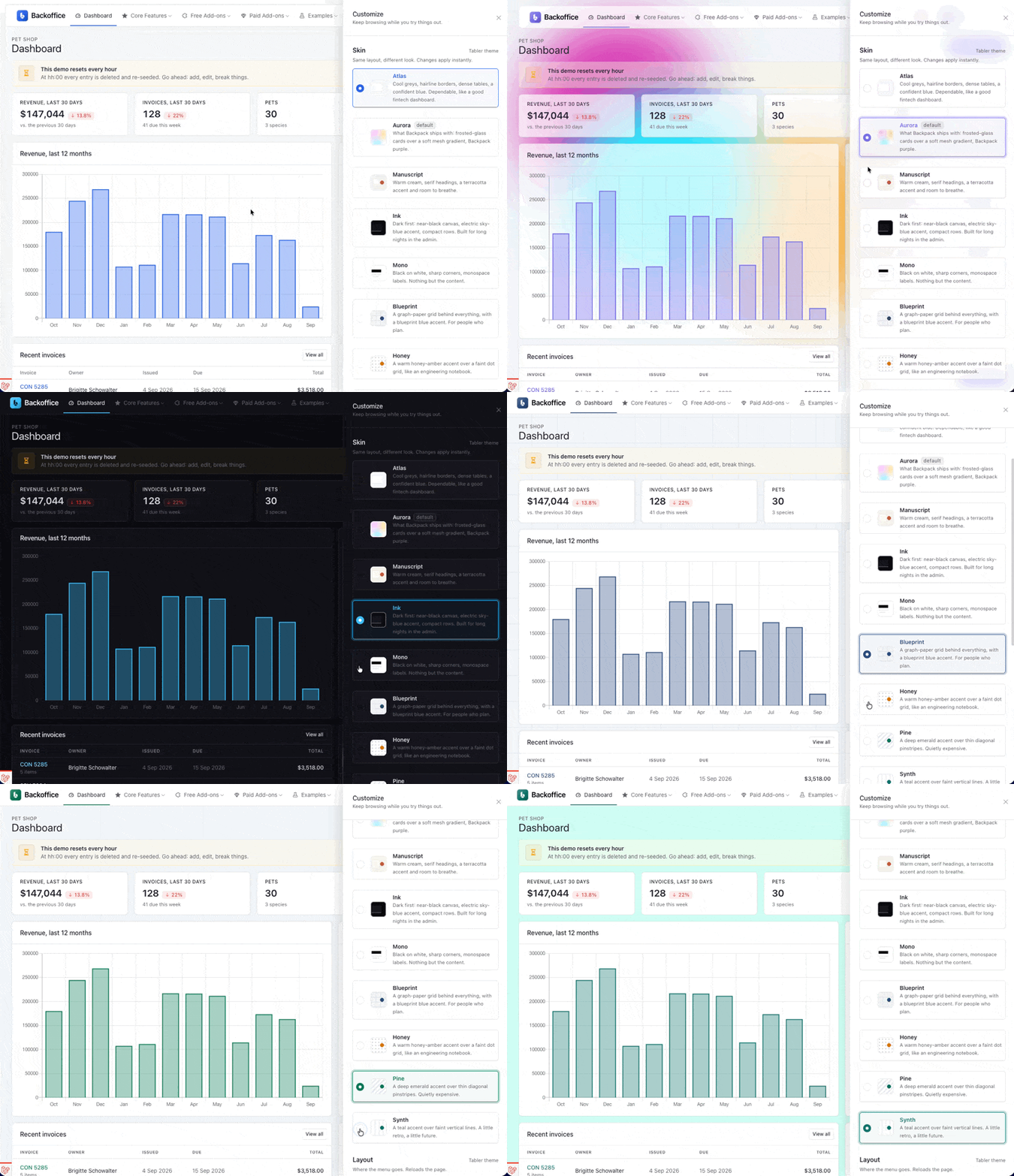
Go try them. We rebuilt the demo around this: there's a Customize button, bottom-right on every page, and it opens a drawer where you switch skins without a reload. Start here: demo.backpackforlaravel.com. Or jump straight to one with ?skin=atlas, ?skin=ink, and so on.
How do you use one? A skin is one CSS file. Enable it with one line in config/backpack/theme-tabler.php:
'styles' => [
    base_path('vendor/backpack/theme-tabler/resources/assets/css/skins/backpack-color-palette.css'),
    base_path('vendor/backpack/theme-tabler/resources/assets/css/skins/atlas.css'),
],
Keep the palette line - the theme needs it - then load exactly one skin after it. That's the whole tutorial. Run composer update backpack/theme-tabler and you have them.
Will this change how my existing project looks? No. That was the one rule for this release: nothing changes unless you opt in. The seven CSS files that were already in the theme are untouched, and the default config still loads the same files it did yesterday. If you don't edit your config, you won't notice v2.1 exists.
Under the hood. Tabler exposes almost everything as CSS variables, and Backpack's palette file sits on top of that. A skin is just a couple of hundred lines that redefine those tokens - colours, borders, radius, shadows, table density - plus a dark-mode block, plus a handful of component tweaks where variables weren't enough. Which means the part I'm actually excited about: you can make your own. Copy atlas.css into your project, change twenty values, point styles at your file, and your admin panel looks like your brand instead of mine. No build step, no SASS, no fork.
A few honest notes:
'defaultColorMode' => 'dark'. In the demo we switch modes for you when you pick it; the package can't do that on its own.@import at the top of the file. Don't want that? Copy the file, delete that line, they fall back to system fonts and still look good.All of this is in the free, open-source theme. No bundle required. It's the kind of thing that's been on my list for a while and finally happened because I got tired of looking at my own demo. Enjoy it, and send us a screenshot of what you build with it. Cheers!
Subscribe to our "Article Digest". We'll send you a list of the new articles, every week, month or quarter - your choice.
What do you think about this?


Wondering what our community has been up to?