New Add-on: ReportOperation - Analytics for Any CrudController
You've built the admin panel. Your team is using it. Data is coming in. And then someone asks: "How many orders did we get last mo...

Cristian Tabacitu
Share:
You've built the admin panel. Your team is using it. Data is coming in. And then someone asks: "How many orders did we get last mo...


You've built the admin panel. Your team is using it. Data is coming in. And then someone asks: "How many orders did we get last month? What's the trend?" And you think... I have all that data in the database. I just have no way to show it nicely.
You could build a custom dashboard page from scratch — write the queries, use our chart widget or hook up Chart.js, wire up AJAX, add filters or... you could add a ReportOperation to your existing CrudController in a few minutes and call it a day. Hell, thanks to its great docs, your LLM can even easily create super-custom metric for your data. That's the new add-on we're launching today.
It adds a Report page to any CrudController. You define your metrics (stats, charts, tables) in a setupReportOperation() method — just like you define columns in setupListOperation(). The page loads fast because each metric fetches its data independently via AJAX, so users see cards and charts pop in as they load rather than waiting for one slow query to finish.
Two filters are injected automatically: a date range picker and an interval selector (Daily / Weekly / Monthly / Yearly). Change the date range, and all relevant charts and stats update instantly.
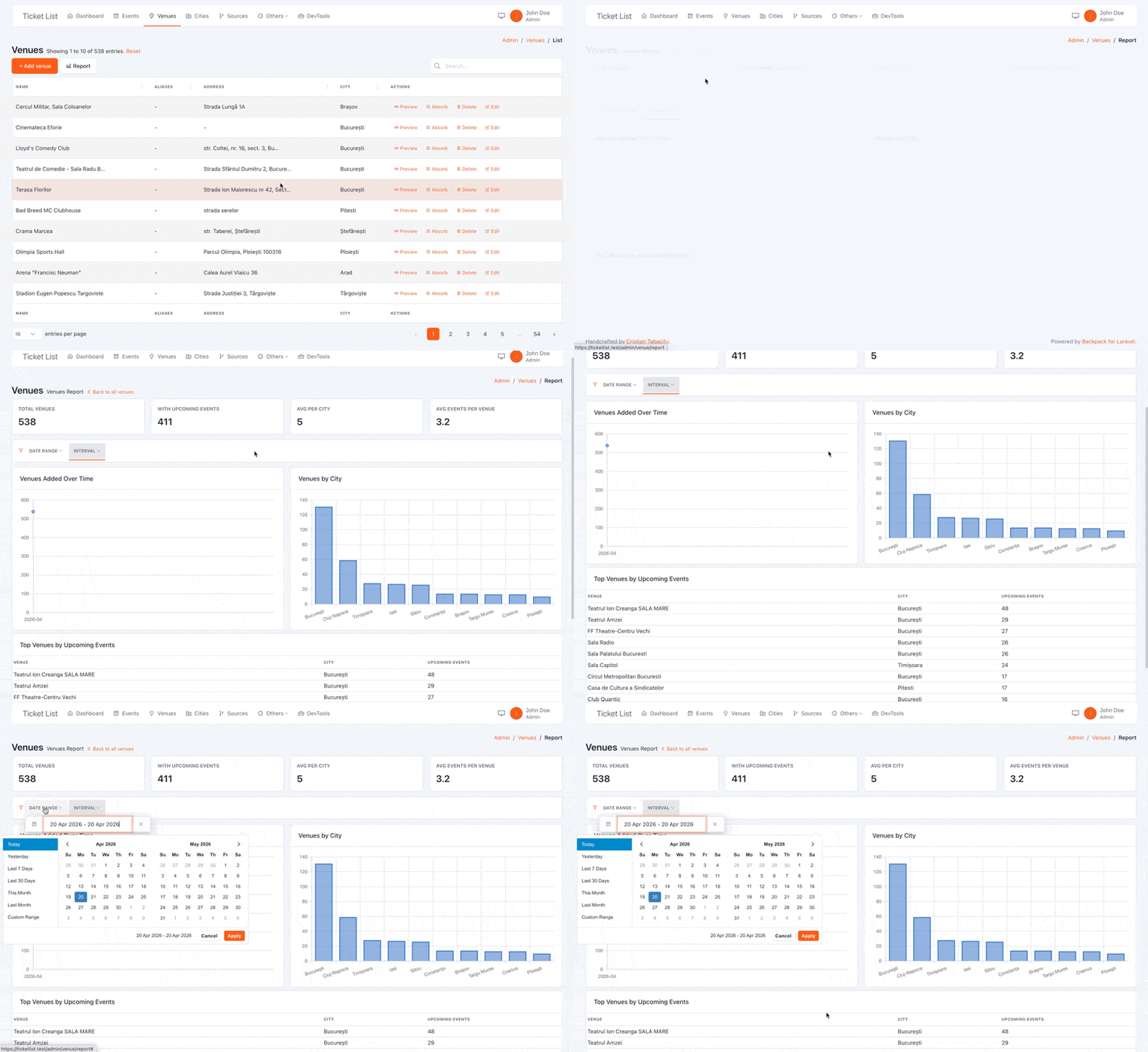
ReportOperation ships with seven built-in metric types:
To add a report to your OrderCrudController, use the trait and define your metrics:
use \Backpack\ReportOperation\Http\Controllers\Operations\ReportOperation;

class OrderCrudController extends CrudController
{
    use ListOperation;
    use ReportOperation;

    protected function setupReportOperation()
    {
        $this->addMetric('total_orders', [
            'type'      => 'stat',
            'label'     => 'Total Orders',
            'aggregate' => 'count',
            'period'    => 'created_at',
            'compare'   => true,  // shows % change vs previous period
        ]);

        $this->addMetric('orders_over_time', [
            'type'      => 'line',
            'label'     => 'Orders Over Time',
            'aggregate' => 'count',
            'period'    => 'created_at',
        ]);
    }
}
That's it. A Report button appears in the List operation's top bar. Click it — you get a stat card and a line chart, both filtered by the date range picker.
If you want something you can drop into any CrudController immediately — here's a complete setupReportOperation() that works on any model that has created_at, updated_at, and optionally deleted_at:
protected function setupReportOperation()
{
    // Static section — always shows all-time totals, unaffected by the date range filter
    $this->addMetric('active_entries',   ['type' => 'stat', 'label' => 'Active',       'section' => 'static', 'wrapper' => ['class' => 'col-md-3']]);
    $this->addMetric('all_time_created', ['type' => 'stat', 'label' => 'Total Created', 'section' => 'static', 'wrapper' => ['class' => 'col-md-3'], 'query' => fn ($q) => $q->withTrashed()]);
    $this->addMetric('all_time_updated', ['type' => 'stat', 'label' => 'Total Edited',  'section' => 'static', 'wrapper' => ['class' => 'col-md-3'], 'query' => fn ($q) => $q->withTrashed()->whereColumn('updated_at', '!=', 'created_at')]);
    $this->addMetric('all_time_deleted', ['type' => 'stat', 'label' => 'Total Deleted', 'section' => 'static', 'wrapper' => ['class' => 'col-md-3'], 'query' => fn ($q) => $q->onlyTrashed()]);

    // Period stats — respond to the date range filter
    $this->addMetricGroup(['class' => 'row'], function () {
        $this->addMetric('created', ['type' => 'stat', 'label' => 'Created', 'period' => 'created_at', 'compare' => true, 'wrapper' => ['class' => 'col-md-4']]);
        $this->addMetric('modified', ['type' => 'stat', 'label' => 'Modified', 'period' => 'updated_at', 'compare' => true, 'query' => fn ($q) => $q->whereColumn('updated_at', '!=', 'created_at'), 'wrapper' => ['class' => 'col-md-4']]);
        $this->addMetric('deleted',  ['type' => 'stat', 'label' => 'Deleted',  'period' => 'deleted_at', 'compare' => true, 'query' => fn ($q) => $q->onlyTrashed(), 'wrapper' => ['class' => 'col-md-4']]);
    });

    // Trend charts
    $this->addMetricGroup(['class' => 'row mt-2'], function () {
        $this->addMetric('creations_over_time', ['type' => 'line', 'label' => 'New Records Over Time', 'period' => 'created_at', 'wrapper' => ['class' => 'col-md-4']]);
        $this->addMetric('updates_over_time',   ['type' => 'bar',  'label' => 'Edits Over Time',       'period' => 'updated_at', 'query' => fn ($q) => $q->whereColumn('updated_at', '!=', 'created_at'), 'wrapper' => ['class' => 'col-md-4']]);
        $this->addMetric('deletions_over_time', ['type' => 'bar',  'label' => 'Deletions Over Time',   'period' => 'deleted_at', 'query' => fn ($q) => $q->onlyTrashed(), 'wrapper' => ['class' => 'col-md-4']]);
    });
}
Paste that in, remove the soft-delete metrics if your model doesn't use SoftDeletes, and you have a genuinely useful report page for any entity in your system.
Static vs. dynamic metrics. You can split your metrics into two sections: static (above the filters, loaded once, always shows all-time data) and dynamic (below the filters, re-fetches on every filter change). The all-time totals up top, the period breakdown below — it just makes sense.
Grouped metrics. If you have several stat cards that query the same table, you can batch them into a single AJAX request with $this->groupMetrics('stats', ['metric_a', 'metric_b']). Fewer HTTP round trips, same result.
Auto-refresh. Add 'refreshInterval' => 30 to any metric and it'll re-fetch every 30 seconds. Great for dashboards that stay open all day and need to show near-real-time numbers. Polling pauses automatically when the browser tab is hidden, so it doesn't hammer your server for nothing.
Custom metric types. The package uses a registry pattern — you can register your own metric types (a PHP resolver + a JS handler) without touching core files. Funnel charts, heatmaps, whatever you need — it's all possible.
AI-Friendly. Thanks to its simple architecture and extensive documentation, you can easily create custom metrics using simple AI prompts. Just point your LLM to the README file of the package, we made sure it would create wonderful metrics, even if they're more specific to your project needs.
ReportOperation is a new premium add-on, available at backpackforlaravel.com/products/report-operation.
If you have the EVERYTHING bundle, you already have access — just install it and start adding report pages to your CRUDs.
We'd love to hear how it works for you. Drop a comment below or start a discussion on GitHub.
Cheers!
Subscribe to our "Article Digest". We'll send you a list of the new articles, every week, month or quarter - your choice.
What do you think about this?
Wondering what our community has been up to?