
This package adds the ability to load Backpack CRUD forms inside Bootstrap modals - and automatically wires them to the CRUD panel's create/update operations.
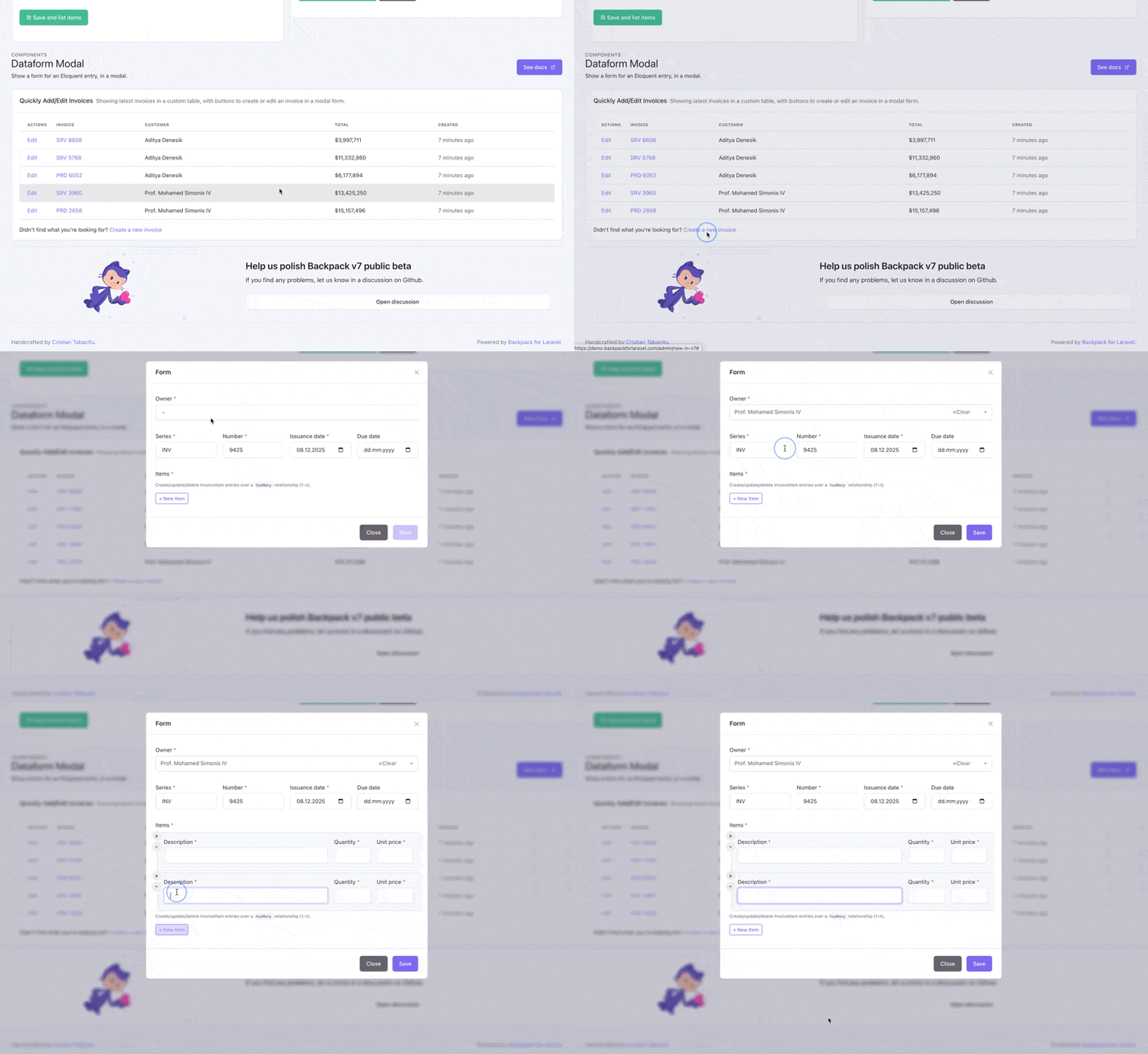
Demo
To see the dataform-modal in action, look at the invoices table in the v7 page in our online demo. Instead of sending you to a different page, the exact same form present in the InvoiceCrudController is shown in a modal.
Installation
Step 0. Buy access to this package or to Everything we create.
Step 1. After purchase, you'll get an access token. With that token in hand, you should instruct your project to pull in missing packages from our private repository, instead of Packagist:
- add your token to your project's
auth.jsonfile by runningcomposer config http-basic.backpackforlaravel.com [your-token-username] [your-token-password] - add the Backpack private repo to your
composer.json:
"repositories": [
    {
        "type": "composer",
        "url": "https://repo.backpackforlaravel.com/"
    }
],
Step 2. Now install the package with Composer:
composer require backpack/dataform-modal
Usage
What it provides
- Traits for CrudControllers:
CreateInModalOperationandUpdateInModalOperation. - Blade views (button partials and a modal component) that inject a Bootstrap modal and the JavaScript that loads/submits the form via AJAX.
- Routes for the modal endpoints (e.g.
create-in-modal,store-in-modal,edit-in-modal,update-in-modal).
Introduction
The dataform-modal helper is a lightweight approach for opening remote forms inside a modal window. Typical flow:
- User clicks a button.
- Client fetches the form HTML (GET) from a URL and places it inside a modal.
- User edits and submits the form.
- Client submits the form via AJAX.
- On validation errors, the server responds with the form containing errors — the modal content is replaced.
- On success, the modal can be closed and the list refreshed.
This keeps the admin UX fast and avoids page reloads when editing related resources.
Basic usage examples
These examples show how to trigger the modal, how to return the form from a controller, and how to handle the submission.
Blade trigger (simple)
Add a button or link that points to the form URL and has a helper data attribute the package listens for:
No extra JavaScript build step is required — the modal component includes the small helper scripts it needs via the Backpack dataform common JS snippets. Make sure your layout loads Backpack's after_scripts stack.
Quick start — use the traits in your CrudController
You can replace the CreateOperation and/or the UpdateOperation, or you can use them alongside those operations.
use Backpack\DataFormModal\Http\Controllers\Operations\CreateInModalOperation;
use Backpack\DataFormModal\Http\Controllers\Operations\UpdateInModalOperation;

class MonsterCrudController extends CrudController
{
		use \Backpack\CRUD\app\Http\Controllers\Operations\ListOperation;
		use CreateInModalOperation;
		use UpdateInModalOperation;
		// ... other operations
}
What the traits do for you:
-
Register the modal-specific routes (e.g.
GET /{entity}/create-in-modal,POST /{entity}/store-in-modal, and equivalents for edit/update). -
Add a convenient Create button (top) and Update button (line) that open the Bootstrap modal (the button Blade partial includes the modal component for you).
-
Provide controller methods
createInModal,storeInModal,editInModal,updateInModalthat render the AJAX response or perform the save using the CRUD panel. -
If your controller already uses Backpack's normal
CreateOperation/UpdateOperation, you can keep thesetupCreateOperation()method to define your form create fields, or use thesetupCreateInModalOperation()method to define the fields/validation similar to the CreateOperation. -
You can use both
CreateOperationandCreateInModalOperationtraits in your CrudController. When using both, the normalCreateOperationis kept in the ListOperation, and you are free to use the Create In Modal anywhere else in your application.
How the modal is injected (Blade component)
The package provides a Blade component x-bp-dataform-modal (class Backpack\DataformModal\View\Components\DataformModal) which renders the modal markup and the JS used to load/submit the form. The create_in_modal and update_in_modal button partials include that component automatically.
You can also include the modal component manually anywhere in your views if you prefer full control. Common attributes:
controller(string) — the fully-qualified controller class to use for the form setup (required).formOperation(string) — operation to isolate and run, defaults tocreateInModal(useupdateInModalfor edit forms).formId(string) — the DOM id for the modal; defaults tobackpack-form.formUrl(string|null) — URL that returns the form HTML (GET). If omitted the component builds it from thecontroller+formOperation.formAction(string|null) — URL where the form will be submitted (POST/PUT). Defaults to the controller'sstore-in-modal/update-in-modalendpoints.formMethod(string|null) — HTTP verb for form submission (postorput).hasUploadFields(bool) — whether the form contains file inputs (will set enctype).entry— optional model instance for edit forms.setup(Closure) — optional closure to programmatically configure the isolated CRUD panel for the modal form.title(string) — modal title.classes(string) — modal dialog classes (e.g.modal-dialog modal-lg).refreshDatatable(bool) — if true the modal will attempt to refresh the table after success (common for list pages).
Example (this is effectively what the package button partial renders):
<x-bp-dataform-modal
		:controller="\App\Http\Controllers\Admin\MonsterCrudController::class"
		formOperation="createInModal"
		:title="'Create Monster'"
		refresh-datatable="true"
 />
The component will render a Bootstrap modal template and small helper scripts that lazy-load the form HTML when the modal opens.
Controller behavior
createInModal()/editInModal()will return a viewbackpack.dataform-modal::component.ajax_responsewhich includes the standard Backpack dataformform_contentmarkup. That view is intended to be returned to the client when the modal requests the form via AJAX.storeInModal()/updateInModal()will run the CrudPanel validation and create/update the entry. On success they flash the standard Backpack success alert and return theperformSaveAction()result which the modal JS will consume.
If you need to customize behavior you can override the trait methods in your controller, but follow the package conventions for route names and expected responses so the JS can handle errors/success correctly.
The modal also attempts to auto-refresh a nearby DataTable when refreshDatatable is enabled on the component.
Security
If you discover any security related issues, please email [email protected] instead of using the issue tracker.
Credits
Created by:
License
This project was released under EULA, so you can install it on top of any Backpack & Laravel project. Please see the license file for more information.
Package Access
You don't currently have access to this package. To gain access, go ahead and purchase it. You'll get:
Next 12 months
- download or install using Composer;
- all updates (major, minor and patch);
After 12 months
- can still access all versions and updates you paid;
- can still install using Composer;
- no new versions or updates;