Why I am excited about Backpack v7.1 release
Backpack v7.0 was a big release. Data components, chips, skins, lifecycle hooks etc. A lot of things changed under the hood. But for me...

Pedro Martins
Share:
Backpack v7.0 was a big release. Data components, chips, skins, lifecycle hooks etc. A lot of things changed under the hood. But for me...


Backpack v7.0 was a big release. Data components, chips, skins, lifecycle hooks etc. A lot of things changed under the hood. But for me, v7.1 is special. It's the kind of release that doesn't scream for attention, but once you see what's inside, you can't go back.
Let me tell you about three things that made me genuinely happy in this version.
Like most of you, I've been using AI coding assistants more and more. They're great, until they're not. The biggest problem? They don't know Backpack. They suggest raw Eloquent queries instead of CRUD::addClause(). They don't know about fields, columns, or filters. You spend half your time correcting them.
Not anymore.
Starting with v7.1, Backpack ships with AI-optimized documentation built right in. When you install laravel/boost and run boost:install, your AI agent (Copilot, Cursor, Claude Code, whatever you use) gets:
The setup is dead simple. If you're installing Backpack fresh, the installer asks you. If you already have Backpack, just run php artisan boost:install and tick the backpack/crud box. Done.
This might sound small, but it changes everything about how fast you can build admin panels. Your AI agent goes from "sometimes helpful" to "actually knows what it's doing." That's a massive productivity boost.
This one is small but it's been requested for years. Literally.
You know the feeling: you open a filter dropdown, pick something, the dropdown closes, and... nothing changes visually. You don't know what's active. You have to click the dropdown again just to check. It's annoying. Especially when you have five filters applied.
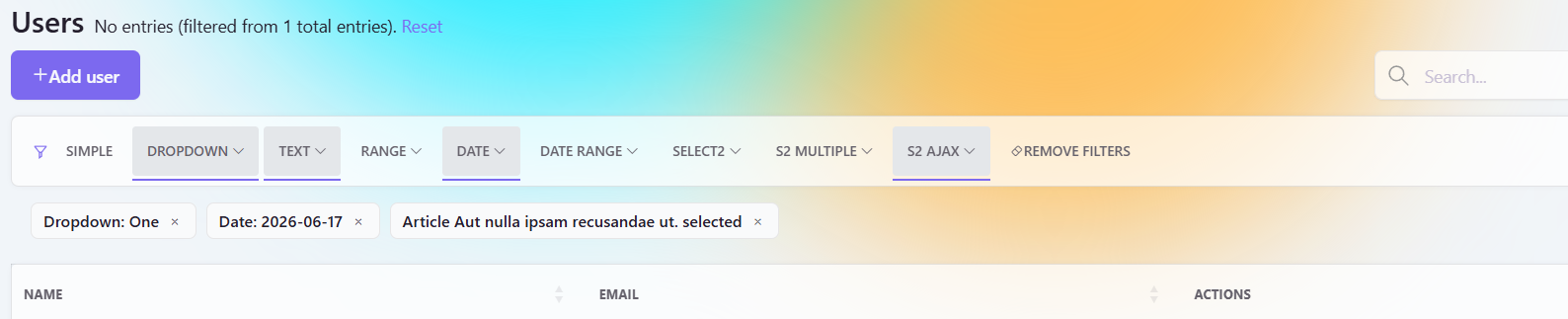
In v7.1, filters can show badges below the navbar. Each badge displays the filter name and the current value. There's a little "×" button to remove the filter instantly. Simple. Obvious. Should have been there from day one.
You turn it on however you want:
->showFilterValues() on any filter definition.config/backpack/operations/list.php.You can even customize how the label looks. Want it to say "Status: Active" instead of "Status Active"? Use ->filterValuesLabel('Status: :value'). Want just the value? ->filterValuesLabel(':value selected').
And here's a nice touch: for select2_ajax filters, the badge shows the human-readable text, not the raw ID. No extra work needed.
It's one of those features that, once you use it, you wonder how you lived without it.
Sometimes you need to highlight something in the table. A premium customer. An overdue invoice. An archived entry that should look faded.
Before v7.1, that meant custom JavaScript or overriding blade templates. It worked, but it was messy.
Now there's a clean way: row attributes.
In your setupListOperation(), you add a closure (or an invokable class) that returns HTML attributes for each row:
$this->crud->setOperationSetting('rowAttributes', function ($entry) {
    return [
        'class'           => $entry->is_premium ? 'table-warning' : '',
        'style'           => $entry->is_archived ? 'opacity: 0.5;' : '',
        'data-entry-type' => $entry->type,
    ];
});
You can set class, style, or any data-* attribute. Return an empty array and the row stays as-is.
Want it global across all CRUDs? Put an invokable class in your config file. Want different logic per entity? Use a closure in each controller. It's flexible without being complicated.
My advice: stick to CSS classes when you can, inline styles work, but classes are easier to maintain long-term.
v7.1 is not a flashy release. It's three very practical things that make your daily work smoother:
No breaking changes. No migration headaches. Just stuff that makes building admin panels a little more enjoyable.
If you're on v7 already, upgrade and try these out. If you're still on v6, well... v7 has been out for a while now. It's a good time to jump in.
Thanks for reading. Happy building.
Subscribe to our "Article Digest". We'll send you a list of the new articles, every week, month or quarter - your choice.
What do you think about this?


Wondering what our community has been up to?
